SITE SPEED · FIELD NOTES
You check your website the way most owners do: on a laptop, on good wifi, where it loads fine. Then a customer opens it on a three-year-old phone with two bars, and it takes several seconds to show up.
A good share of them are gone before your homepage finishes. Google is watching that too, and it quietly ranks slow sites lower.
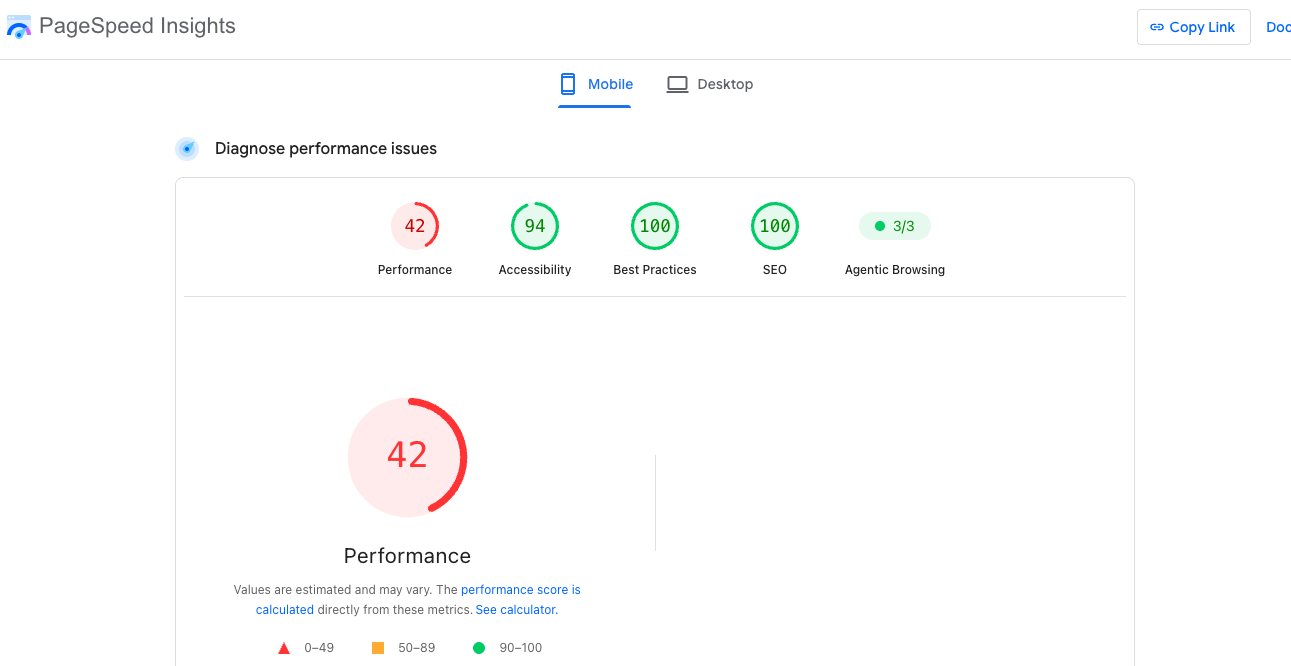
I ran into exactly this recently on a WordPress site built in Elementor. On a phone it scored 42 out of 100 for speed. On a laptop it looked great, which is precisely why it had gone unnoticed. The fast version is the only one most owners ever see.
The first thing I did was nothing
Slow sites get “optimized” constantly by people changing settings on a hunch, and about half the time it makes them slower. So I measured first, and read the results closely enough to find the one thing actually holding the page back instead of the ten things that sounded plausible.
THE RESULT, IN THREE NUMBERS
Source: Google PageSpeed Insights (2026). Desktop scored a perfect 100.
What was actually slowing it down
On this site it was the code, not the server and not the images. The page was loading its whole toolbox of scripts before it would show a single word.
A few specific changes fixed it. I cleaned up the fonts, which turned out to be loading more than twenty typefaces and using four. I got the styling to load in the right order, so text appears almost immediately instead of waiting on everything else. I held the heavy code back until a visitor actually scrolls or taps, so the page paints instantly and the machinery loads a half-second later, when it’s needed. And I matched the backup font to the real one, so the text stops nudging around as the page settles.
After every change I measured again, and anything that didn’t clearly help, I took back out. That last part is the whole trick. It’s discipline, not cleverness.
Here’s the before and after
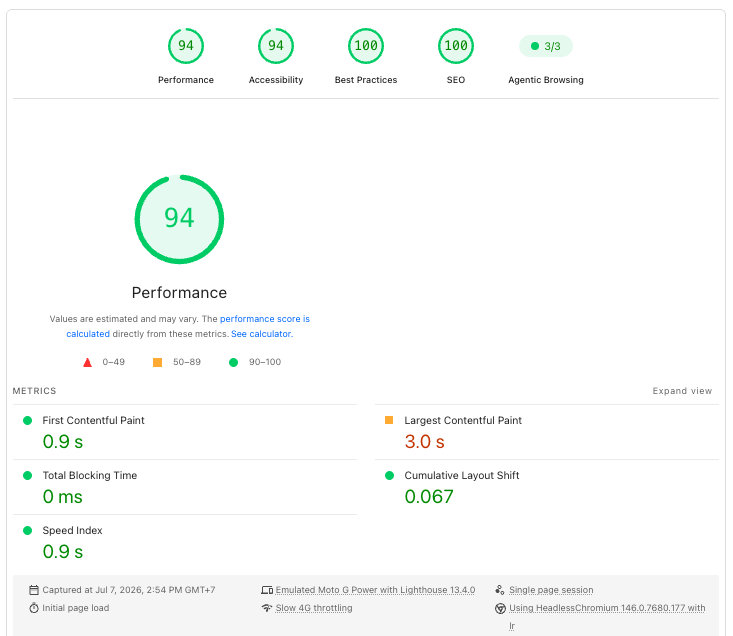
Same site. It just loads the way it should have all along.
Three quick things I’d check on your site
If I were looking at your site right now, these are the first things I’d open.
- Pull up your homepage on your actual phone, off wifi, and count the seconds until you can read something. If it’s more than two or three, your visitors feel it.
- Run it through Google PageSpeed Insights, which is free, and look at the mobile score, not the desktop one. Desktop almost always looks better than reality.
- Watch the page as it loads. If things jump, shift down, or flash, that’s fixable, and it’s quietly costing you trust.
Try this yourself
You don’t have to guess. Go to PageSpeed Insights, type in your homepage, and read the mobile number. Most of the WordPress and Elementor sites I see land in the 40s and 50s, and their owners have no idea, because it looks fine on their own screen.
My takeaway
A slow site rarely announces itself. It just quietly loses the visitors who won’t wait, and the search ranking that comes with them. The fix usually isn’t a rebuild. It’s finding the one real bottleneck and being disciplined about the rest.
Your design deserves a site that loads as good as it looks.